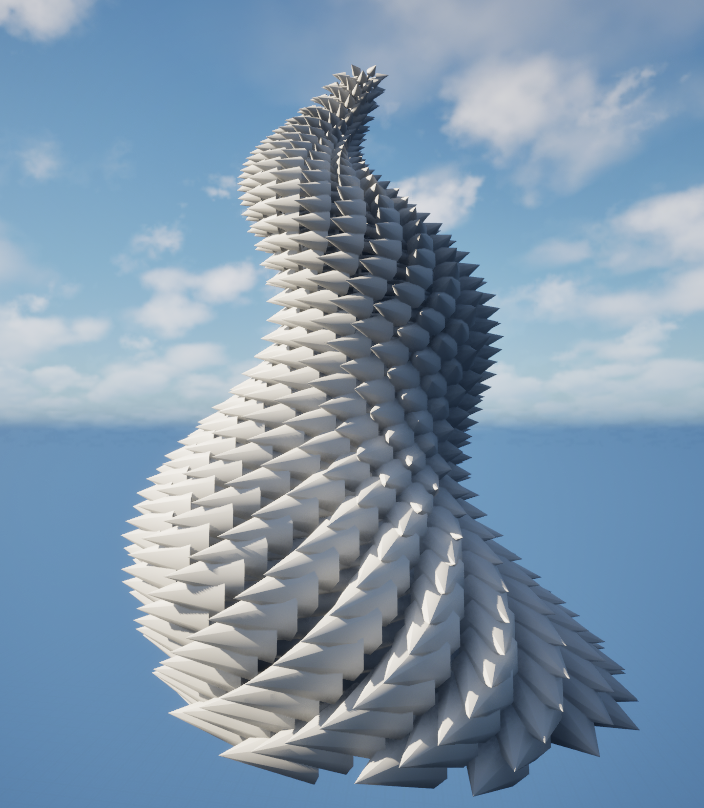
A fully parametric phyllotaxis generator that updates instantly in the Unreal editor. No bake yet,this stage focuses on creative iteration, clarity, and speed.
Goals & Constraints
Changes apply as you tweak. It is great for exploration and layout.
Controls are about shape and feel, not implementation details.
Drop one in a level and drive everything from its details.
This phase is preview-only in the editor. Baking to a single mesh is planned.
Real-Time Workflow (Editor)
The generator runs during construction, so you see the result immediately while adjusting sliders. It scatters instances efficiently and keeps the viewport responsive. Rebuilds are triggered only when something actually changes, so you can nudge values without stutter.
Creative Controls & Shaping
Rather than hardcoding a single formula, the generator exposes intuitive controls that morph the pattern across a wide family of botanical looks:
How many elements, how far they reach, and how tall the form grows.
Set near the classical “golden angle” for natural spirals, or drift for stylized arms and rings.
Lightweight curves shape radius, height, scale, and subtle rotation drift across the sequence.
Blend toward sphere-like shells, cones, or torus-like loops; add gentle bend and taper for character.
Face elements outward, along the spiral, or lock them to a preferred direction.
Controlled randomness for position and angle.
Look-Dev & Materials
For look development, the instance material reads a few light signals from each element and turns them into gradients and micro-variation:
- Center → rim gradient
Ease color or brightness from the core to the edge for a natural seed-head feel. - Vertical tint
Subtle top/bottom difference helps depth and readability on taller forms. - Per-element variance
Tiny roughness or color offsets break uniformity without noise. - Optional glow
Center emphasis via emissive works well for graphic or VFX looks.
The source mesh matters: a simple “seed” or “petal” with a consistent pivot and forward direction gives predictable alignment and avoids surprises while rotating along the spiral.
Performance Notes
The generator is built for large counts. A few habits keep it smooth:
- Instancing
All elements are instances of a single mesh, minimizing draw calls. - Cheap previews
Collision disabled for previews; shadows kept minimal or off for dense sets. - Reasonable culling
Only render what the camera can reasonably see. - Lean materials
Opaque, simple shading; use emissive instead of translucency for glow.
Dev Progression
Short clips showing the generator.
What’s Next
Create a one-click path to a single static mesh (with Nanite and simple collision) once a look is approved.
Save/load favorite shapes: sunflower head, pinecone, rosette, torus flower, column.
Changelog
- Sept 4, 2025: Initial write-up: real-time editor generator, controls, materials, and performance notes.